> ## Documentation Index
> Fetch the complete documentation index at: https://integrations.truecold.io/llms.txt
> Use this file to discover all available pages before exploring further.
# Quickstart
> Create your first webhook in under five minutes
## Overview
The TrueCold Webhook allows you to receive real-time notifications about important events in your system.
In this quickstart guide, you will learn how to set up a webhook and receive notifications for new alerts.
TrueCold allows you to create different types of webhooks fot different events. By now, the app
supports the following webhooks:
* [Alerts](./alert/alert-webhook) : Triggered when an alert has been generated or updated on some entity linked with a sensor.
## Setting Up the Webhook
To set up a Webhook, follow these steps:
1. **Create a Webhook Endpoint**: Set up an endpoint on your server to receive webhook events. This endpoint should be able to handle HTTP requests.
2. **Register the Webhook**: Register your webhook endpoint in the TrueCold app. You can do this by clicking on the *Add new Webhook* located in the *Integrations* tab from the *Account* page.
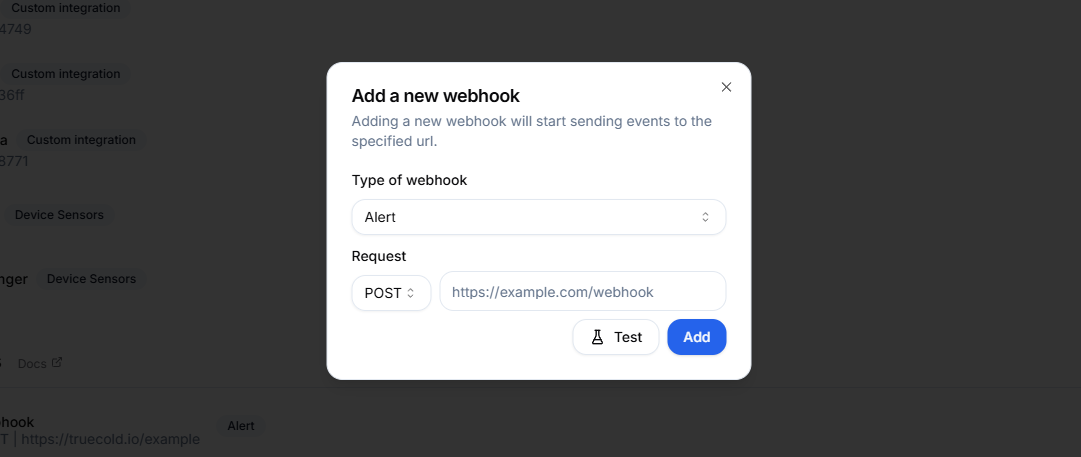 3. **Verify the Webhook**: You can test your webhook by clicking on the *Test* button. This will send a test payload to your endpoint.